Available in US only
The initial rollout of this application is limited to the US market. Global availability is planned for a future release pending localization, compliance, and infrastructure readiness. Stay tuned for updates.
Overview
Medit AuraVue is a web-based consultation tool that uses 3D scan data and radiographs (X-ray) to support clear and effective communication between doctors and patients. The application helps doctors assess and take notes on a patient’s oral health during their visit, accompanied by corresponding visuals. In doing this, doctors can leverage 3D scan data as well as radiographs that contain AI-driven analysis conducted by Overjet, an FDA-approved third-party program. All findings are then organized into a patient-oriented dental report that includes visual representations of the identified pathologies, simplified explanations of diagnoses, proposed treatment options, and estimated costs. The finalized report is saved as a PDF file, which can be shared directly with the patient to support discussion and record keeping. An active internet connection is required in order to use the application.
Product Name | Medit AuraVue |
Model Name | MA-AAV |
Version | 2.0.0 |
UDI DI | (01)8800026700890 |
UDI PI | (10)2.0.0 |
Basic UDI-ID | 88000267MA-AAV8W |
Note
Basic Subscription Plan: Overjet is integrated into Medit AuraVue and does not require separate installation or configuration.
Pro Subscription Plan: Overjet must be installed and set up separately, with guidance and support provided by the Overjet team. Contact vendor-support@overjet.ai for details.
Intended Use
Medit AuraVue is a software application intended to support patient consultation and clinical communication by displaying dental imaging data (intraoral scan data and panoramic image data) and diagnostic results processed by third-party AI software, and generating reports. Medit AuraVue is intended for viewing and communication purposes only and does not provide independent diagnostic analysis or treatment recommendations.
Indications for Use
Medit AuraVue is intended for use by dental professionals to visualize and review intraoral scan data and panoramic image data for patient consultation and clinical communication. The device displays diagnostic findings processed by third-party AI software and generates summary reports of displayed findings. The device is intended for use with adult patients (22 years of age or older). Medit AuraVue provides adjunctive decision support only and does not perform AI processing, generate autonomous diagnoses, or issue treatment recommendations.
Contraindications
Not applicable. This software is not used for medical diagnosis, treatment, or disease prevention.
Intended User Profile
Dental professionals such as dentists.
Intended Patient Population
Medit AuraVue is intended for use with general dental patients who require dental consultation and clinical communication. The device is specifically indicated for adult patients (22 years of age or older) whose dental imaging data (intraoral scans and panoramic images) are available for review.
Disclaimer
Medit AuraVue was not developed for medical or clinical use. As such, it cannot be used for the following purposes:
diagnosing, treating, mitigating, or preventing diseases/injuries/disorders.
inspecting, replacing, or transforming a structure or function.
The software is meant to be used as a visual aid during patient consultations or as a tool for analysis tasks. The generated simulation and analysis results should not be used as the sole source of healthcare guidance.
Medit does not take responsibility for any miscommunication or improper use of the software and is not liable to either the user or the patient for any decisions or actions taken in reliance on the information given by the software.
The user assumes full responsibility for the following:
generated results and their further interpretation and communication to the patient
informing the patients that the results produced by the software may not be precise or reliable
actions and treatment decisions based on the generated results
The final report file is intended for reference purposes only and does not constitute a medical history. For a comprehensive diagnosis and treatment plan, please refer to the official medical records.
Patient Safety Advisory
Medit AuraVue is designed to support clinical communication; however, a qualified dental professional must make the final clinical decision. The dental professional is responsible for overseeing the visualized outputs and ensuring that all information is consistent with the patient's actual condition before proceeding with consultation or treatment.
Security Risk Management and Error Handling
After the issue has been improved, if it is necessary to update the program, such as releasing a new installation file or applying some patch files, it is officially distributed through the head office sales/SE personnel, along with the application guide, to the person in charge of the corporation or the issue site.
Responses to security issues may be further announced on the website if necessary.
During the issue handling and recovery process, temporary operational restrictions may occur to ensure system stability and data integrity:
Patient data may be temporarily inaccessible until the recovery process is completed.
Clinical workflows may be interrupted; normal operations will resume once administrative actions have been completed. Patient data will not be automatically deleted during this process.
A warning message will be displayed, and additional data entry will be restricted until the issue is resolved.
User sessions may be automatically logged out to prevent unauthorized access.
Security Response Procedure
Reporting security issues
Share initial analysis results and progress
Issue delivery
Issue response plan / delivery
Issue response plan / share results
System Requirements
Hardware Requirements
Windows | macOS | |
|---|---|---|
CPU | Intel Core i5 2.6 GHz or higher | 8-core or higher |
Chip | - | M1/M2 or higher |
RAM | 16 GB or higher | 16 GB or higher |
Graphics Card | NVIDIA GeForce GTX 1060(2 GB) or higher | - |
Software Requirements
Windows | macOS | |
|---|---|---|
OS | Windows 10 64-bit, Windows 11 64-bit | Sonoma 14 or later |
Browser Support
Google Chrome
Microsoft Edge
Safari
Network Requirements
Network Type: wired LAN or Wi-Fi (WPA2 or higher)
Bandwidth: minimum 100 Mbps (1Gbps recommended)
Protocol: IPv4
Port: TCP 443
Latency: average below 50ms
Security Requirements
Authentication: Password must be 8-16 characters long, including a combination of at least three of the following: letters, numbers, and special characters. Passwords are accepted in English only.
Encryption: TLS 1.2 or higher, HTTPS transmission
Antivirus & Patches: keep the operating system and antivirus up to date
This software continuously monitors for security events such as unauthorized access, tampering attempts, and data integrity errors.
Unauthorized Access Prevention:
Only individuals who have been granted Admin account privileges in Medit Link can access patient information and internal servers. During the registration process, each user is assigned account permissions to manage and prevent unauthorized access.
Cybersecurity Information
Medit AuraVue does not access any patient PII/PHI from Medit Link. In this system, the communication and API exchanges use scan data files identified only by the patient’s Case ID rather than any PII/PHI.
Preparations and Handling Before/During Device Use
Product installation procedure: managed via the Cloud
Mandatory user validation when creating Medit Link Account:
Create a user account in Medit Link
Send a user validation email
User confirms the validation
User logs in
Troubleshooting guide: https://support.medit.com/hc/en-us
Required Facilities, Training, and User Qualifications
Local network administrators/operators must have IT expertise (network, server, OS security configuration).
Cloud services are managed on AWS by Medit administrators (AWS certified).
Information to Verify Proper Installation and Safe Operation
AuraVue Updates
As a web-based application, the latest version is provided automatically without the need for manual updates in App Box.
Cloud Services: Managed and monitored through AWS Trusted Advisor with regular updates to apply required security measures.
Data and Settings Backup/Restore
Data generated in AuraVue is uploaded to the Cloud and managed via Medit Link.
Backups/restores can be performed by downloading data as needed.
User logs are retained for 3 months and can be manually deleted.
Stored data can be deleted from the Case Box in Medit Link, and the responsibility for such deletion rests with the user who performs it.
Cases can be transferred using the Case Converting Tool in the Settings menu of Medit Link.
When a user account is deleted, all user data (e.g., personal information, usage logs such as log-in and feature usage) and database data are permanently removed and cannot be restored.
Integrity and Verification of Software Security Patches
The executable file of AuraVue is automatically digitally signed during installation and verification, so users do not need to take any additional action.
IT Network Precautions
Guidelines
Execution of the health software on an IT-network could result in previously unidentified risks to patients, users or third parties. The responsible organization is advised to identify, analyze, evaluate and control these risks.
Hazard Situations
Always ensure that your system is protected by the latest version of antivirus software and an active firewall.
Connecting the network to any device other than Medit AuraVue may result in potential virus infections or data tampering. Verify that the network is operating under appropriate administrative control before proceeding.
Even if automatic backup is configured, no backup will be performed if the software is not running or if the designated backup location is unavailable.
Subsequent changes to the IT network could introduce new risks and may require additional analysis. Such changes include:
Modifications to the IT network configuration.
Adding items (hardware, software platforms, or software applications) to the IT network.
Removing items from the IT network.
Updating software applications on the IT network.
Upgrading software platforms or software applications on the IT network.
In the event of a cybersecurity incident, if the cybersecurity detection software identifies a threat, the user must report it to the manufacturer and to the competent authority of the Member State.
Installation Guide
Log in to your Medit Link account and go to the App Box on the left-hand menu.
In the Medit Apps tab, find the Medit AuraVue app and click "Install."
(1).png)
Read the Software License Agreement and confirm app installation by clicking "Accept and Install."
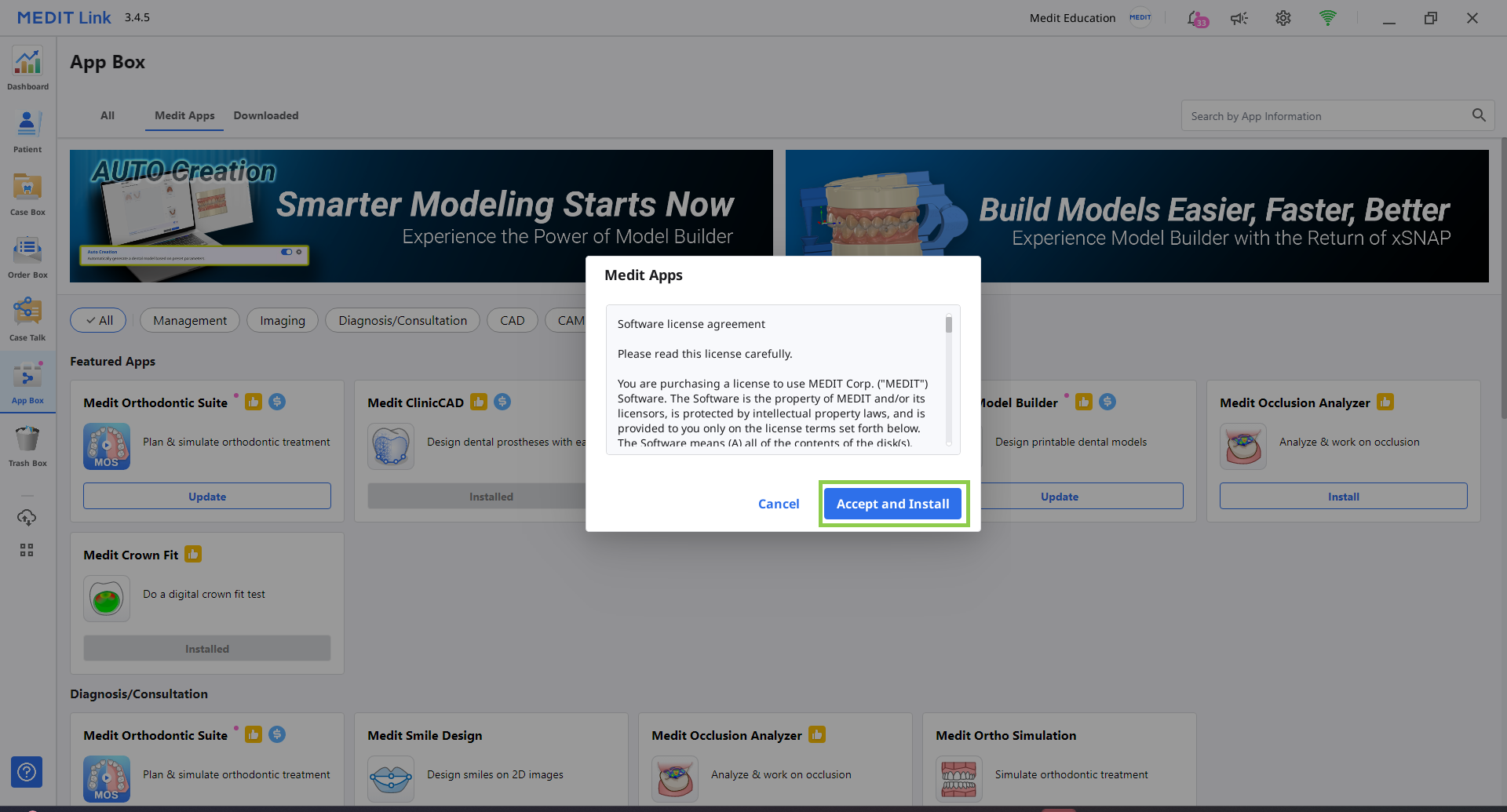
The app will be downloaded and installed automatically. It may take several minutes to finish the installation process.
 Caution
Do not turn off the PC or close Medit Link during the installation process.
Once the app is installed, you can run it from any case in Medit Link by clicking the app icon in the top right corner of the Case Details window.

To uninstall an app, go to the App Box and click the app card to open its details page, where you’ll find the Uninstall option.
Note
For Pro Plan subscribers, contact the Overjet team at vendor-support@overjet.ai for details on installation.